创建启用新架构的应用
:::caution 注意
这个文档仍然是实验性的,随着我们的迭代,细节会有变化。欢迎在工作小组内的讨论中分享你的反馈。
此外,它还包含几个手动步骤。请注意新架构尚未稳定下来,最终的开发者体验会继续迭代改善。我们正在努力开发工具、模板和库,以帮助你在新架构上快速入门,而不需要经历整个设置过程。
:::
本文档将帮助你从头创建一个启用了新架构的 React Native 应用。
开发环境
在继续之前,请确保你已经完成搭建开发环境中的完整原生环境中的所有步骤。
如果正在按照指南搭建,当配置到运行你的 React Native 应用程序部分时停止,然后继续按照本指南进行。
:::caution 注意 如果你正在使用 Expo,则目前无法启用新架构,必须等待 Expo 的未来版本。 :::
创建新应用
如果你之前全局安装过旧的
react-native-cli命令行工具,请使用npm uninstall -g react-native-cli卸载掉它以避免一些冲突:
If you already have your development environment set up, create a new React Native project from the template:
npx react-native init AwesomeProject
:::caution 注意 The New Architecture is available in React Native version 0.68 or later. :::
配置
按照以下步骤,启用新架构并构建应用程序。
启用 Hermes
Hermes is an open-source JavaScript engine optimized for React Native. Hermes will be the default engine in the future, and we highly recommend you use it.
Please follow the instructions on the React Native website in order to enable Hermes in your application.
启用新架构
Target OS
- Android
- iOS
Navigate to the ios directory and run the following:
# from `ios` directory
bundle install && RCT_NEW_ARCH_ENABLED=1 bundle exec pod install
Then build and run the app as usual:
yarn ios
:::note 备注
You will need to run pod install each time a dependency with native code changes. Make this command easier to run by adding it to scripts to your project's package.json file:
"scripts": {
  "pod-install": "RCT_NEW_ARCH_ENABLED=1 bundle exec pod install"
}
and run it with yarn pod-install. Note that bundle install does not need to run a second time, as long as the Gemfile has not changed.
:::
常见问题
react-native run-ios fails
If you see a build failure from react-native run-ios, there may be cached files from a previous build with the old architecture. Clean the build cache and try again:
- Open the project
ios/project.xcworkspacein Xcode - In XCode, choose Product > Clean Build Folder
- In the project directory, remove the
ios/Podfile.lockfile andios/Podsdirectory:rm -rf ios/Podfile.lock ios/Pods - Re-run
yarn pod-installandyarn ios
Set the newArchEnabled property to true by either:
- Changing the corresponding line in
android/gradle.properties - Setting the environment variable
ORG_GRADLE_PROJECT_newArchEnabled=true
Then build and run the app as usual:
yarn android
:::note 备注 You may notice longer build times with the New Architecture, due to additional step of C++ compilation with the Android NDK. To improve your build time, see Speeding Up Your Build Phase. :::
Confirming the New Architecture is in use
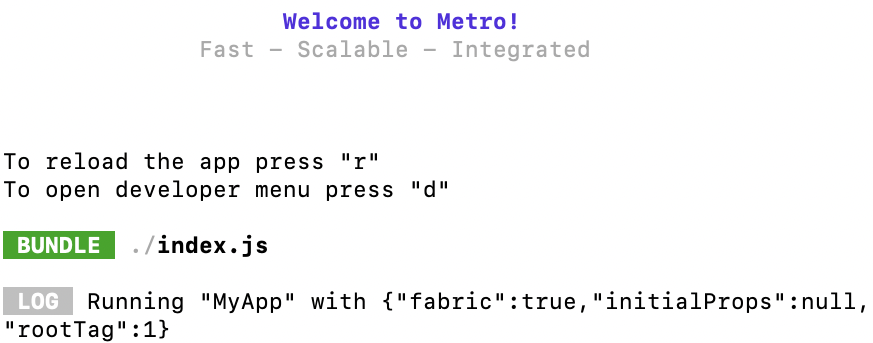
After you build and run the app, when Metro serves the JavaScript bundle, you should see "fabric": true in the Metro logs:
Want to know more?
If you'd like to view the code changes relevant for the New Architecture, take a look at the upgrade helper from version 0.67.4 to 0.68.0. Files that were added for the New Architecture are marked with a yellow banner.
For further explanations of what each file is doing, check out these guides to walk through the changes step-by-step: